> ## Documentation Index
> Fetch the complete documentation index at: https://docs.a2v2.ai/llms.txt
> Use this file to discover all available pages before exploring further.
# Plans
> Choose a subscription that fits your stage — from a free start to growing teams — and see what each plan includes.
You've built an agent, trained it on your content, and you're ready to put it in
front of real visitors. The plan you choose decides how many agents you can run,
how much knowledge each can hold, how many teammates can help, and how many
**credits** you get each month to power answers.
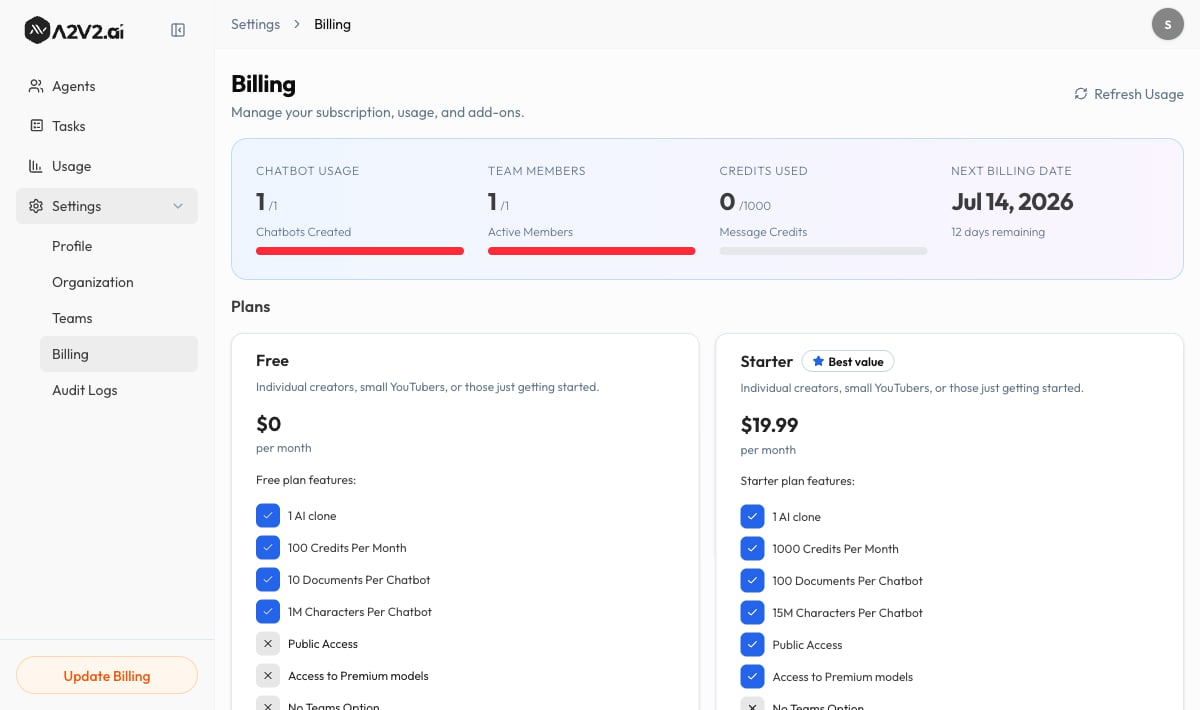
Plans live under **Billing** in your organization settings, on the **Plans** tab.
## Prerequisites
* You must be the organization **Owner** to change the plan or manage billing.
* Subscribing and upgrading happen through Stripe — see
[Checkout & billing portal](/billing/checkout-and-portal).
## The plans
A2V2.ai offers four tiers. Each is sized for a different stage of growth:
| Plan | Best for |
| -------------- | -------------------------------------------------------------------- |
| **Free** | Individual creators, small YouTubers, or those just getting started. |
| **Starter** | Individual creators, small YouTubers, or those just getting started. |
| **Pro** | Growing channels, small businesses, or creators with more content. |
| **Enterprise** | Large businesses, agencies, or creators with complex content needs. |
On the Plans tab, the plan you're on is marked **Current Plan**, and standout
tiers carry a **Recommended** or **Best value** badge.
 ## What a plan includes
Each plan card lists its features. The dimensions that change between tiers are:
| Feature | What it controls |
| -------------------------- | ------------------------------------------------------------------------------------------------------------------------------------- |
| **Credits Per Month** | Your monthly plan-credit allowance for messages, document processing, and voice. See [Credits explained](/billing/credits-explained). |
| **AI clone(s)** | How many agents you can run. |
| **Documents Per Chatbot** | How many sources each agent's knowledge base can hold (higher tiers offer **Unlimited Documents Per Chatbot**). |
| **Characters Per Chatbot** | The total amount of trained content per agent. |
| **Team members** | How many people can join your organization (lower tiers show **No Teams Option**; others allow **Up to 3** or more). |
| **Premium models** | Whether you get **Access to Premium models** for higher-quality answers. |
| **Public Access** | Whether agents can be made publicly available to visitors. |
Exact credit allowances, character limits, and prices are shown live on each plan
card and may change. Always confirm the current numbers on the **Plans** tab
before subscribing.
Need more agents or seats than your plan includes without moving up a full tier?
You can buy them individually — see [Add-ons](/billing/add-ons).
## The trial
New subscriptions can start with a **free trial**. While you're in it, the app
shows how long you have left — for example, **"Trial ends in 7 days"**.
A trial converts to a paid subscription automatically when you add a payment
method through checkout. If the trial ends without a valid payment method on
file, your organization moves back to the **Free** plan — your data stays, but
paid features and your higher credit allowance pause until you subscribe.
Use the trial to load real content, point an agent at your site, and watch your
credit burn rate on the **Usage** page. That tells you which plan tier actually
fits your traffic before you commit.
## Change or downgrade your plan
You can move between plans at any time from the **Plans** tab:
Find the plan you want and select it.
Upgrades take you to Stripe checkout to confirm payment. See
[Checkout & billing portal](/billing/checkout-and-portal).
To move to a lower tier, use **Downgrade** on the plan card.
Before downgrading, make sure you're within the lower plan's limits — for example,
the number of agents and team members it allows. You may need to archive agents or
remove members first.
## Troubleshooting
Only the organization **Owner** can manage plans and billing. Ask your owner
to make the change, or have them transfer ownership.
This usually means a trial ended without a payment method, or a payment didn't
go through. Open [Checkout & billing portal](/billing/checkout-and-portal) to
update your payment method and re-subscribe. Your content is preserved.
Buy extra agent or team-member slots as [add-ons](/billing/add-ons) instead of
upgrading the whole tier.
## Related
What credits are and what spends them.
Subscribe and manage payment details.
Buy extra agents and team-member seats.
Never run out of credits mid-rush.
## What a plan includes
Each plan card lists its features. The dimensions that change between tiers are:
| Feature | What it controls |
| -------------------------- | ------------------------------------------------------------------------------------------------------------------------------------- |
| **Credits Per Month** | Your monthly plan-credit allowance for messages, document processing, and voice. See [Credits explained](/billing/credits-explained). |
| **AI clone(s)** | How many agents you can run. |
| **Documents Per Chatbot** | How many sources each agent's knowledge base can hold (higher tiers offer **Unlimited Documents Per Chatbot**). |
| **Characters Per Chatbot** | The total amount of trained content per agent. |
| **Team members** | How many people can join your organization (lower tiers show **No Teams Option**; others allow **Up to 3** or more). |
| **Premium models** | Whether you get **Access to Premium models** for higher-quality answers. |
| **Public Access** | Whether agents can be made publicly available to visitors. |
Exact credit allowances, character limits, and prices are shown live on each plan
card and may change. Always confirm the current numbers on the **Plans** tab
before subscribing.
Need more agents or seats than your plan includes without moving up a full tier?
You can buy them individually — see [Add-ons](/billing/add-ons).
## The trial
New subscriptions can start with a **free trial**. While you're in it, the app
shows how long you have left — for example, **"Trial ends in 7 days"**.
A trial converts to a paid subscription automatically when you add a payment
method through checkout. If the trial ends without a valid payment method on
file, your organization moves back to the **Free** plan — your data stays, but
paid features and your higher credit allowance pause until you subscribe.
Use the trial to load real content, point an agent at your site, and watch your
credit burn rate on the **Usage** page. That tells you which plan tier actually
fits your traffic before you commit.
## Change or downgrade your plan
You can move between plans at any time from the **Plans** tab:
Find the plan you want and select it.
Upgrades take you to Stripe checkout to confirm payment. See
[Checkout & billing portal](/billing/checkout-and-portal).
To move to a lower tier, use **Downgrade** on the plan card.
Before downgrading, make sure you're within the lower plan's limits — for example,
the number of agents and team members it allows. You may need to archive agents or
remove members first.
## Troubleshooting
Only the organization **Owner** can manage plans and billing. Ask your owner
to make the change, or have them transfer ownership.
This usually means a trial ended without a payment method, or a payment didn't
go through. Open [Checkout & billing portal](/billing/checkout-and-portal) to
update your payment method and re-subscribe. Your content is preserved.
Buy extra agent or team-member slots as [add-ons](/billing/add-ons) instead of
upgrading the whole tier.
## Related
What credits are and what spends them.
Subscribe and manage payment details.
Buy extra agents and team-member seats.
Never run out of credits mid-rush.