> ## Documentation Index
> Fetch the complete documentation index at: https://docs.a2v2.ai/llms.txt
> Use this file to discover all available pages before exploring further.
# Duplicate an Agent
> Copy an existing agent — knowledge, prompts, and customization included — as the starting point for a new one.
You've spent weeks tuning your Support agent: the right instructions, a polished
widget, a full knowledge base. Now you need a second agent for a different product
line — almost the same, but not quite. Instead of rebuilding from scratch,
**Duplicate** it and change only what's different.
Duplicating makes a full background copy of an agent under a new name. It's the
fastest way to spin up a variant — a staging version of a live agent, a
per-region clone, or a new team's starting point.
## Prerequisites
* You must be an **organization Admin**. Duplicate is an admin-only action.
* Your plan must have a **free agent slot** — a duplicate becomes a new, separate
agent (see [Credits & plans](/concepts#credits)).
* The source agent must **already be set up** and have **at least one document** in
its knowledge base.
## What gets copied
When you duplicate an agent, the copy starts as a near-identical twin — with a few
deliberate exceptions. Anything tied to money or an outside service is reset so you
review it before the new agent goes live, and anything tied to the original's
real-world activity is left behind.
| Included (copied) | Reset on the new agent | Not copied |
| -------------------------------- | ------------------------ | ------------ |
| All documents and knowledge base | Paid access setup | Chat history |
| Prompts and agent settings | Third-party integrations | Contacts |
| Customization and layout | | |
| Tools and skills | | |
The new agent also gets a **fresh, empty CRM** (and, for a Medical agent, a fresh
health-metrics schema) — the structure carries over, but no contact records do.
**Paid access** and **third-party integrations** are switched off on the copy on
purpose. If the original agent charged for access or connected to an outside
service, reconfigure those on the new agent before you share it. See
[Paid agents](/billing/paid-agents) and [Integrations](/integrations/overview).
## Duplicate an agent
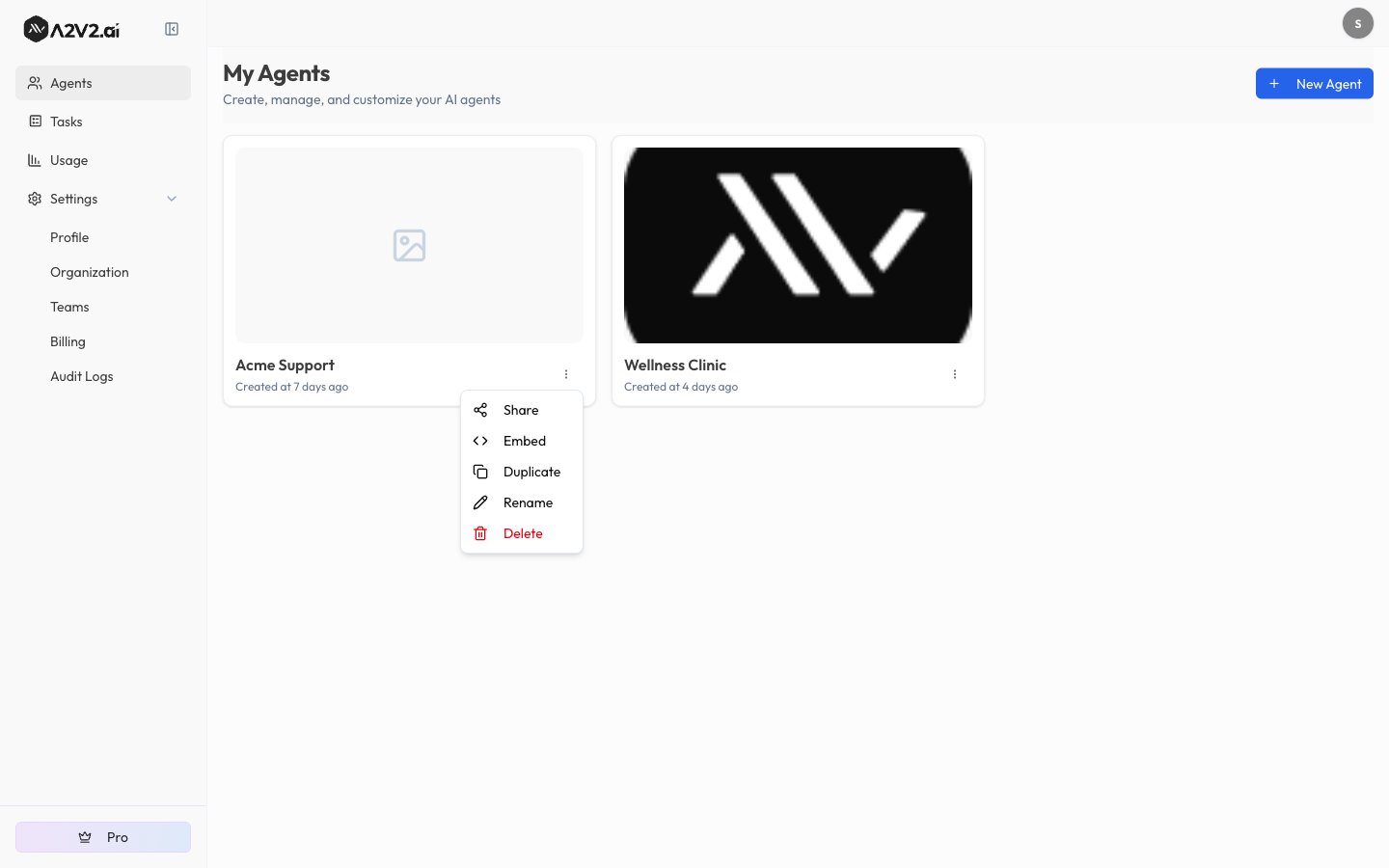
On the **Agents** dashboard, find the agent you want to copy and open its
**⋯** (more) menu. You'll see **Share**, **Embed**, **Duplicate**,
**Rename**, and **Delete**.
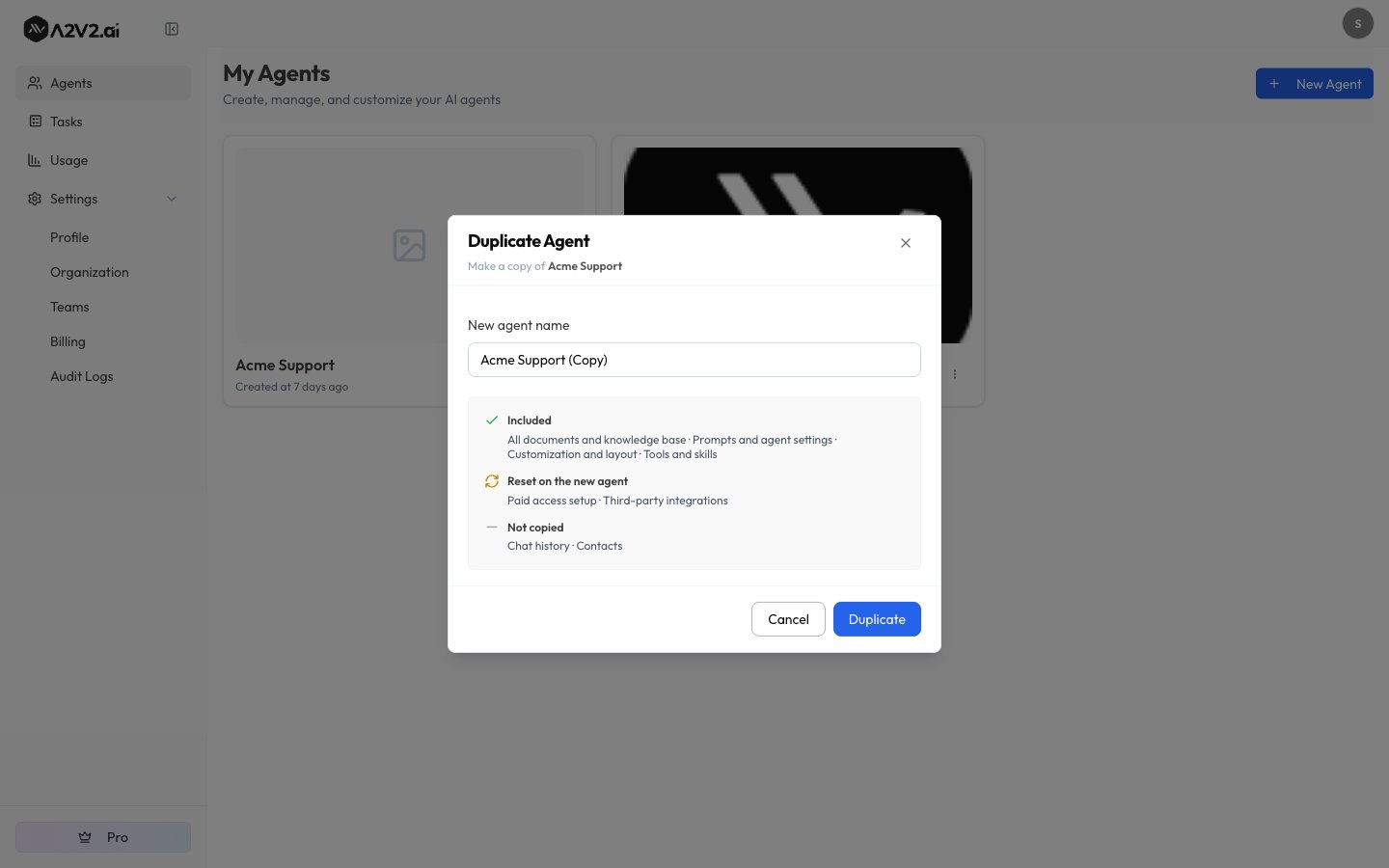
 Select **Duplicate**. The **Duplicate Agent** dialog opens, titled
"Make a copy of \[your agent]."
Enter a **New agent name**. A2V2 pre-fills a unique name with a **(Copy)**
suffix — if that's taken it suggests **(Copy 2)**, **(Copy 3)**, and so on.
The name must be unique within your organization and 100 characters or fewer.
The dialog also lists exactly what's **Included**, **Reset on the new agent**,
and **Not copied**, so there are no surprises.
Select **Duplicate**. The **Duplicate Agent** dialog opens, titled
"Make a copy of \[your agent]."
Enter a **New agent name**. A2V2 pre-fills a unique name with a **(Copy)**
suffix — if that's taken it suggests **(Copy 2)**, **(Copy 3)**, and so on.
The name must be unique within your organization and 100 characters or fewer.
The dialog also lists exactly what's **Included**, **Reset on the new agent**,
and **Not copied**, so there are no surprises.
 Select **Duplicate** to confirm. Copying runs in the background, so you can
keep working — you don't have to wait on the dialog.
A **Duplicating…** card appears on your dashboard with a live progress
percentage. When it finishes, you'll see **"\[name] is ready"** and the new
agent appears in your list, ready to open and edit.
Large knowledge bases take longer to copy — usually a few minutes, since every
document and its search index are re-created for the new agent. The progress card
keeps you posted; there's no need to refresh or wait on the page.
## Cancel a copy in progress
Changed your mind while it's still building? Select **Cancel** on the
**Duplicating…** card. A2V2 stops the job and **removes the half-built new agent**
— you'll see "Duplication cancelled and the new agent has been removed." Nothing
about the original is affected. Cancelling is admin-only, the same as starting a
copy.
## Troubleshooting
The most common reason is **no free agent slots**: the menu shows the hint
**"No agent slots left."** A duplicate is a new agent, so it needs an open
slot — remove an unused agent or upgrade your plan (see
[Credits & plans](/concepts#credits)). Duplicate is also unavailable while the
source agent is **still being set up** — wait for it to finish provisioning.
You can only run **one active copy of a given agent at a time**. Wait for the
current **Duplicating…** card to finish (or cancel it), then start the next
copy.
The source needs **at least one document** in its knowledge base, and its
document count can't exceed your plan's **per-agent document limit**. Add a
document to an empty agent, or check your plan's limits, then try again.
Agent names must be **unique within your organization**. Accept the suggested
**(Copy)** name or enter a different one (100 characters or fewer).
Duplicating is an **Admin-only** action. If you're not an organization Admin,
ask one to run the copy for you (see
[Members & roles](/settings/members-and-roles)).
## Related
Start a brand-new agent from scratch instead.
The documents that carry over — and how to add more.
Reconfigure paid access on the copy (it's reset).
Reconnect third-party services on the copy (also reset).
Select **Duplicate** to confirm. Copying runs in the background, so you can
keep working — you don't have to wait on the dialog.
A **Duplicating…** card appears on your dashboard with a live progress
percentage. When it finishes, you'll see **"\[name] is ready"** and the new
agent appears in your list, ready to open and edit.
Large knowledge bases take longer to copy — usually a few minutes, since every
document and its search index are re-created for the new agent. The progress card
keeps you posted; there's no need to refresh or wait on the page.
## Cancel a copy in progress
Changed your mind while it's still building? Select **Cancel** on the
**Duplicating…** card. A2V2 stops the job and **removes the half-built new agent**
— you'll see "Duplication cancelled and the new agent has been removed." Nothing
about the original is affected. Cancelling is admin-only, the same as starting a
copy.
## Troubleshooting
The most common reason is **no free agent slots**: the menu shows the hint
**"No agent slots left."** A duplicate is a new agent, so it needs an open
slot — remove an unused agent or upgrade your plan (see
[Credits & plans](/concepts#credits)). Duplicate is also unavailable while the
source agent is **still being set up** — wait for it to finish provisioning.
You can only run **one active copy of a given agent at a time**. Wait for the
current **Duplicating…** card to finish (or cancel it), then start the next
copy.
The source needs **at least one document** in its knowledge base, and its
document count can't exceed your plan's **per-agent document limit**. Add a
document to an empty agent, or check your plan's limits, then try again.
Agent names must be **unique within your organization**. Accept the suggested
**(Copy)** name or enter a different one (100 characters or fewer).
Duplicating is an **Admin-only** action. If you're not an organization Admin,
ask one to run the copy for you (see
[Members & roles](/settings/members-and-roles)).
## Related
Start a brand-new agent from scratch instead.
The documents that carry over — and how to add more.
Reconfigure paid access on the copy (it's reset).
Reconnect third-party services on the copy (also reset).