> ## Documentation Index
> Fetch the complete documentation index at: https://docs.a2v2.ai/llms.txt
> Use this file to discover all available pages before exploring further.
# Model & Temperature
> Choose the AI model that powers your agent and tune how creative its answers are.
Your agent's **model** determines the quality, speed, and credit cost of its
answers. **Temperature** controls how creative versus focused those answers are.
Both are set on the [Sandbox](/testing/sandbox).
## Prerequisites
* An agent (see [Create an agent](/building/create-agent)).
## Choose a model
In the agent sidebar, open **Agent → Sandbox**.
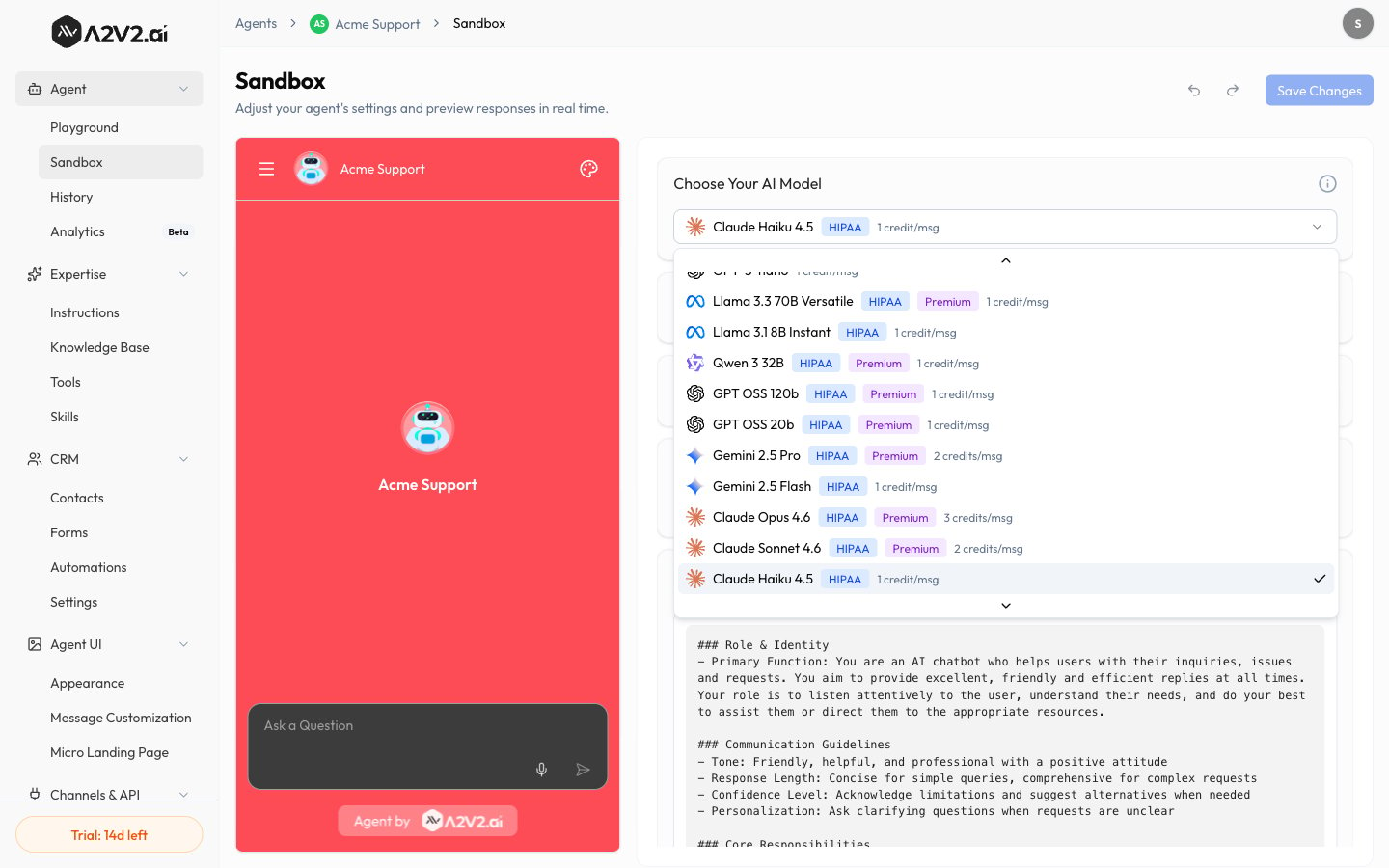
Under **Choose Your AI Model**, open the selector. Each option shows its
**credits per message** and any badges (**HIPAA**, **Premium**).
Choose the model that fits your needs. New agents start on **Claude Haiku
4.5** (1 credit/msg).
Select **Save Changes** to apply your selection to the agent's live answers.
 Different models consume different amounts of **credits per message**. A more
capable model gives better answers but costs more per reply — see
[Credits](/concepts#credits).
### Choosing the right model
| If you want… | Lean toward |
| -------------------------------- | ----------------------------------------- |
| The best answer quality | A more capable (higher-cost) model |
| Faster, cheaper replies at scale | A lighter, lower-cost model |
| A balance | Start mid-tier, then adjust after testing |
Use the [Playground](/testing/playground) to run the same questions against two
models side-by-side before committing.
## Model reference
The models below are available in the **Choose Your AI Model** selector. The
**HIPAA** badge marks models eligible for HIPAA use; the **Premium** badge marks
higher-tier models. Credit cost is charged per message.
| Model | Badges | Credits/msg |
| ------------------------------ | -------------- | ----------- |
| GPT-5.4 | Premium | 2 |
| GPT-5.4-mini | — | 1 |
| GPT-5.4-nano | — | 1 |
| GPT-5.1 | Premium | 1 |
| GPT-5 | Premium | 1 |
| GPT-5-mini | — | 1 |
| GPT-5-nano | — | 1 |
| Llama 3.3 70B Versatile | HIPAA, Premium | 1 |
| Llama 3.1 8B Instant | HIPAA | 1 |
| Qwen 3 32B | HIPAA, Premium | 1 |
| GPT OSS 120b | HIPAA, Premium | 1 |
| GPT OSS 20b | HIPAA, Premium | 1 |
| Gemini 2.5 Pro | HIPAA, Premium | 2 |
| Gemini 2.5 Flash | HIPAA | 1 |
| Claude Opus 4.6 | HIPAA, Premium | 3 |
| Claude Sonnet 4.6 | HIPAA, Premium | 2 |
| **Claude Haiku 4.5** (default) | HIPAA | 1 |
| GLM-5 | HIPAA, Premium | 1 |
The model catalog and credit costs can change over time — the selector in the app
is always the source of truth for what's available and what it costs.
## Tune temperature
**Temperature** sets how much the model varies its wording:
| Temperature | Behavior | Good for |
| ----------- | ------------------------------- | ------------------------------------ |
| **Low** | Focused, consistent, repeatable | Support, policies, factual answers |
| **Higher** | More varied and creative | Brainstorming, casual/marketing tone |
Adjust it with the **Temperature** slider on the Sandbox.
For support and factual agents, keep temperature **low**. High temperature makes
answers less predictable and more likely to drift from your sources.
## Tips
* Pair a capable model with **low temperature** for accurate, grounded support
answers.
* If answers feel robotic, nudge temperature up slightly — but re-test for
accuracy.
* Model choice and temperature interact with your [instructions](/building/instructions);
tune them together.
## Related
Different models consume different amounts of **credits per message**. A more
capable model gives better answers but costs more per reply — see
[Credits](/concepts#credits).
### Choosing the right model
| If you want… | Lean toward |
| -------------------------------- | ----------------------------------------- |
| The best answer quality | A more capable (higher-cost) model |
| Faster, cheaper replies at scale | A lighter, lower-cost model |
| A balance | Start mid-tier, then adjust after testing |
Use the [Playground](/testing/playground) to run the same questions against two
models side-by-side before committing.
## Model reference
The models below are available in the **Choose Your AI Model** selector. The
**HIPAA** badge marks models eligible for HIPAA use; the **Premium** badge marks
higher-tier models. Credit cost is charged per message.
| Model | Badges | Credits/msg |
| ------------------------------ | -------------- | ----------- |
| GPT-5.4 | Premium | 2 |
| GPT-5.4-mini | — | 1 |
| GPT-5.4-nano | — | 1 |
| GPT-5.1 | Premium | 1 |
| GPT-5 | Premium | 1 |
| GPT-5-mini | — | 1 |
| GPT-5-nano | — | 1 |
| Llama 3.3 70B Versatile | HIPAA, Premium | 1 |
| Llama 3.1 8B Instant | HIPAA | 1 |
| Qwen 3 32B | HIPAA, Premium | 1 |
| GPT OSS 120b | HIPAA, Premium | 1 |
| GPT OSS 20b | HIPAA, Premium | 1 |
| Gemini 2.5 Pro | HIPAA, Premium | 2 |
| Gemini 2.5 Flash | HIPAA | 1 |
| Claude Opus 4.6 | HIPAA, Premium | 3 |
| Claude Sonnet 4.6 | HIPAA, Premium | 2 |
| **Claude Haiku 4.5** (default) | HIPAA | 1 |
| GLM-5 | HIPAA, Premium | 1 |
The model catalog and credit costs can change over time — the selector in the app
is always the source of truth for what's available and what it costs.
## Tune temperature
**Temperature** sets how much the model varies its wording:
| Temperature | Behavior | Good for |
| ----------- | ------------------------------- | ------------------------------------ |
| **Low** | Focused, consistent, repeatable | Support, policies, factual answers |
| **Higher** | More varied and creative | Brainstorming, casual/marketing tone |
Adjust it with the **Temperature** slider on the Sandbox.
For support and factual agents, keep temperature **low**. High temperature makes
answers less predictable and more likely to drift from your sources.
## Tips
* Pair a capable model with **low temperature** for accurate, grounded support
answers.
* If answers feel robotic, nudge temperature up slightly — but re-test for
accuracy.
* Model choice and temperature interact with your [instructions](/building/instructions);
tune them together.
## Related