> ## Documentation Index
> Fetch the complete documentation index at: https://docs.a2v2.ai/llms.txt
> Use this file to discover all available pages before exploring further.
# Add Q&A Pairs
> Give your agent exact answers to the questions you already know customers ask.
A **Q\&A** source is a question paired with the exact answer you want the agent to
give. Q\&A pairs are the most precise way to train an agent — perfect for FAQs,
policies, pricing, and any response you want to control word-for-word.
## When to use Q\&A
Use Q\&A when the answer must be exact — refund policy, hours, pricing tiers.
Add Q\&A for questions your documents don't cover well.
## Prerequisites
* An agent (see [Create an agent](/building/create-agent)).
* The question (as a customer would ask it) and the answer you want returned.
## Add a Q\&A pair
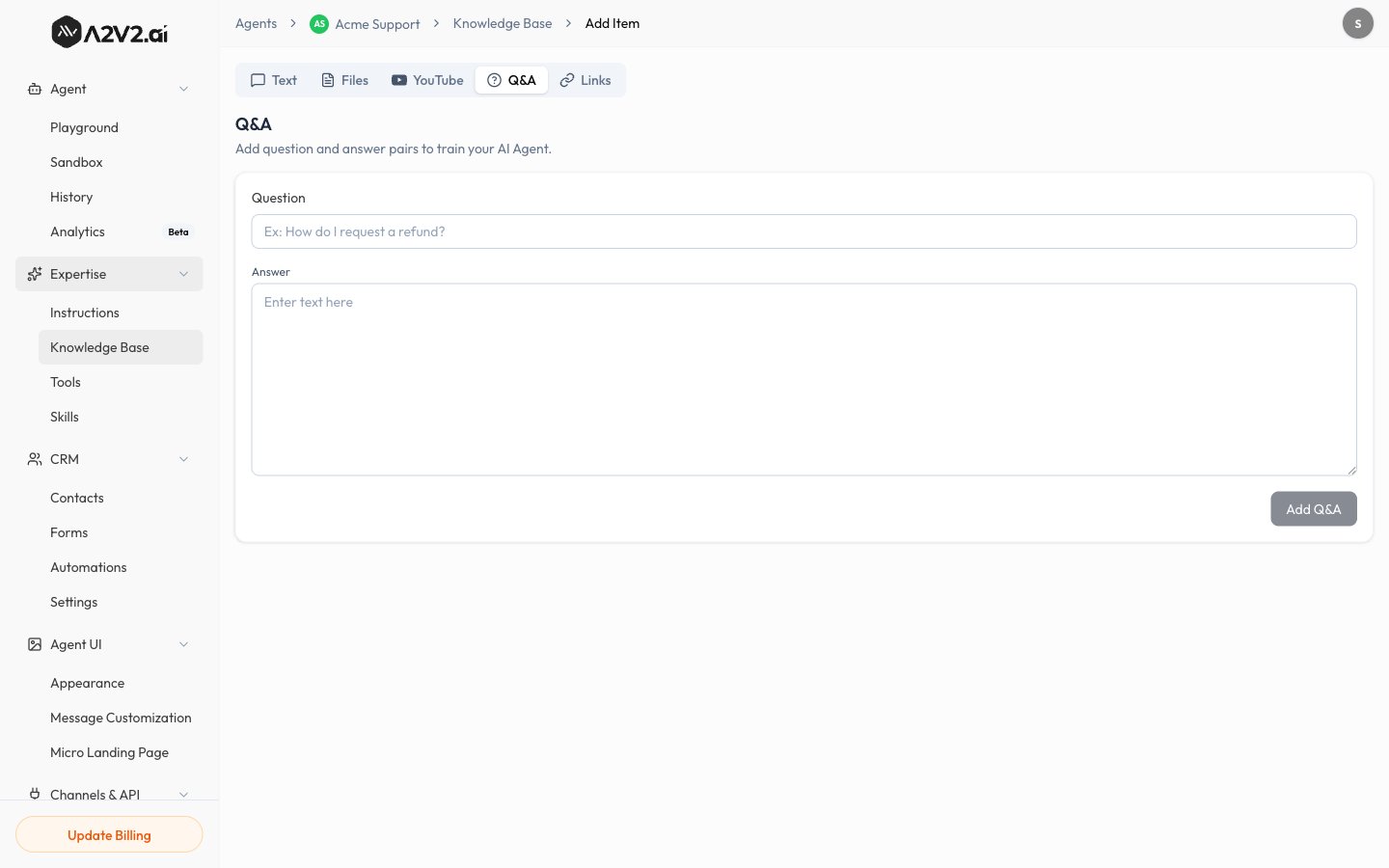
In the agent sidebar, go to **Expertise → Knowledge Base**.
Select **New Knowledge Item**, then open the **Q\&A** tab.
Phrase it the way a real customer would ask.
Enter the exact response you want the agent to give.
The pair is indexed (usually quickly) and becomes live when **Completed**.
 ## Editing a Q\&A
You can update an existing Q\&A pair from the source list — change the question or
answer and it's re-indexed automatically. See
[Manage sources](/knowledge-base/manage-sources).
## Tips
* Write the **question in the customer's words**, not internal jargon — that's how
it gets matched.
* Add a few **variations** of the same question as separate pairs if customers
phrase it many ways.
* Keep answers self-contained so they read well on their own in a chat reply.
## Troubleshooting
Another source may be a stronger match, or the question wording differs. Add a
closer-matching question variation, and make sure conflicting older sources are
[updated or removed](/knowledge-base/manage-sources).
## Related
## Editing a Q\&A
You can update an existing Q\&A pair from the source list — change the question or
answer and it's re-indexed automatically. See
[Manage sources](/knowledge-base/manage-sources).
## Tips
* Write the **question in the customer's words**, not internal jargon — that's how
it gets matched.
* Add a few **variations** of the same question as separate pairs if customers
phrase it many ways.
* Keep answers self-contained so they read well on their own in a chat reply.
## Troubleshooting
Another source may be a stronger match, or the question wording differs. Add a
closer-matching question variation, and make sure conflicting older sources are
[updated or removed](/knowledge-base/manage-sources).
## Related