

When do I need a skill?
If you can answer the question with one fact, you need knowledge, not a skill.
Before you start
You’ll need an agent — see Create an agent. Skills are shared across your whole organisation, so one skill can be used by as many agents as you like. You write it once.Creating, editing and sharing skills is limited to owners and admins. If you
can see skills but the buttons are switched off, that’s why.
Create your first skill
1
Open Skill Library
It’s in the main sidebar. This is where all your organisation’s skills live.
2
Select New Skill
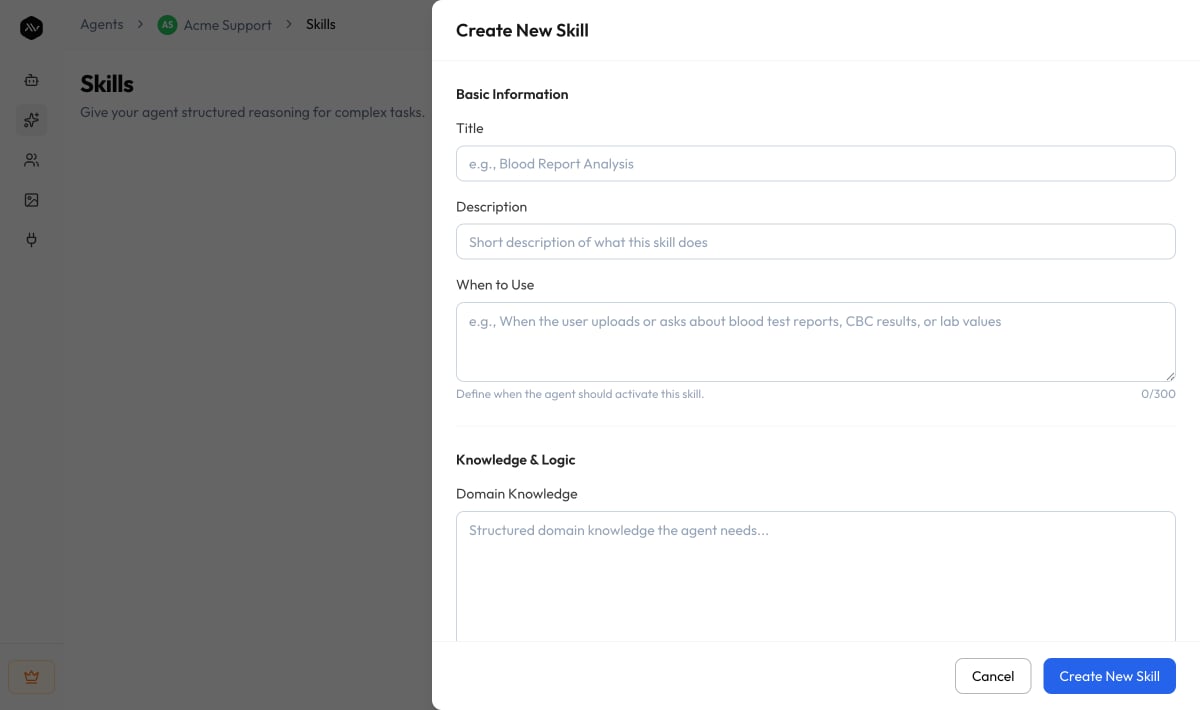
A form opens with three sections. Only two fields are essential to start:
Title and When to Use.
3
Say when the agent should use it
When to Use is the most important thing you’ll write. Describe the
request in the words a customer would actually use:“When someone asks if they can return or get money back for an order.”Not: “Refund eligibility determination.” The agent is matching against how
people really ask.
4
Write the procedure
Domain Knowledge is what the agent needs to know — your refund window,
which categories are excluded, who to escalate to. Reasoning Steps is
the order to work through it. Guardrails are the lines it must not
cross, like “never promise a refund before checking the order date.”
5
Try it out
Go to Sandbox and ask the question a customer would ask.
If the agent doesn’t use your skill, your When to Use probably needs to
sound more like the real question.
Give the skill to an agent
Creating a skill from the Skill Library saves it, but doesn’t attach it to anyone yet. To put it to work:1
Find the skill and open its ⋯ menu
On either the Skill Library or an agent’s Skills page.
2
Choose Manage sharing
You’ll see every agent in your organisation, with tick boxes.
3
Tick the agents that should use it, then Save
Tick to switch the skill on for that agent, untick to switch it off.
Two screens, two questions
Changing a skill affects every agent using it
This is the one thing worth pausing on. Because a skill is written once and shared, editing it changes it everywhere, and deleting it removes it from every agent using it. If three agents rely on your refund procedure and you rewrite it, all three change. That’s usually what you want — fix the procedure once, everyone benefits. But it’s worth knowing before you edit. You’ll never have to guess who’s affected:- Every skill row names the agents using it.
- The delete confirmation lists exactly which agents lose it, and offers to simply switch it off for the agent you’re on instead.
What the fields do
Basic Information
Basic Information
Knowledge & Logic
Knowledge & Logic
Constraints & Output
Constraints & Output
Why fewer skills work better
Your agent doesn’t read every skill in full on every message. It sees a short summary of each one — the title, description and when-to-use — and opens only the skill that fits the request. That means Domain Knowledge can be as long as it needs to be. It’s only read when the skill is actually used. But it also means the agent has to choose. The more skills an agent has, the more options it’s picking between — and past roughly 25, you may notice it choosing less reliably. If an agent doesn’t need a skill, switch it off.Limits
If an agent is already at 75 and you create another skill, nothing you wrote is
lost — the skill is saved to your library, just not switched on for that agent
until you make room.If your organisation reaches 500 skills, contact support to raise the limit.