

Prerequisites
- A signed-in account. What you see depends on your role: Owners and Admins see “Activity across your organisation,” while a User sees only “Your recent activity across the platform.” See Members & roles.
Reading the log
Each entry is a row in the activity table: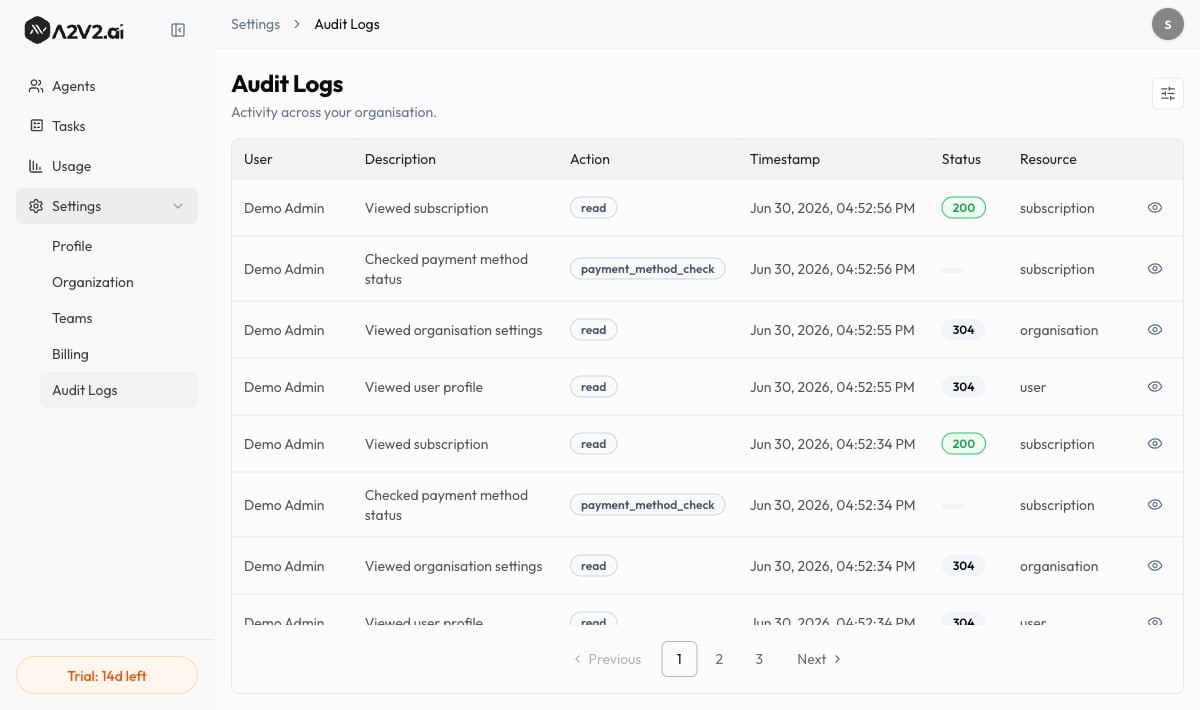
Filter the activity
Use the Filters panel to narrow the log:
Select Clear all to reset the filters.
Inspect a single entry
Open an entry to see its Log Details drawer, which expands on the row with the technical context behind the action — including the Method & Endpoint, Response Time, any Error, and the Request Body, Query Params, and Route Params involved. Entries without that context show “No payload data.”Troubleshooting
I only see my own activity
I only see my own activity
Organization-wide logs are visible to Owners and Admins. As a User you see
only your own activity. Ask an Admin if you need a broader view. See
Members & roles.
The table is empty
The table is empty
No entries match your current filters. Widen the Time range, set User to All
users and Action to All actions, or select Clear all to reset.
I can't go back further than 90 days
I can't go back further than 90 days
The time-range filter offers up to the last 90 days. Capture anything you need to keep
for longer outside the app within that window.
Related
Members & roles
Roles decide who can see organization-wide activity.
API keys & permissions
Scope external access — another lever for accountability.
Organization
Manage the workspace these logs belong to.
Your profile
Your name is what shows in the User column.