

Prerequisites
- An agent (see Create an agent).
- For CRM tools to be useful, your CRM should be set up so there are contacts and fields to act on.
How tools work
During a conversation, the agent decides — based on the question and your instructions — whether a tool would help. If it does, the agent calls the tool, reads the result, and folds it into its answer. The visitor just sees a natural reply; behind the scenes the agent may have looked up their record or fetched the current date. When a tool runs, the chat shows a brief Tools used indicator so it’s clear the agent took an action rather than guessing. You can also see which tools ran for any message in Conversation history. The Tools screen lists the tools available to your agent, grouped by category, with a count of how many are enabled (for example, 6/9). Each tool shows its name, a short description of what it does, and its credit cost per use.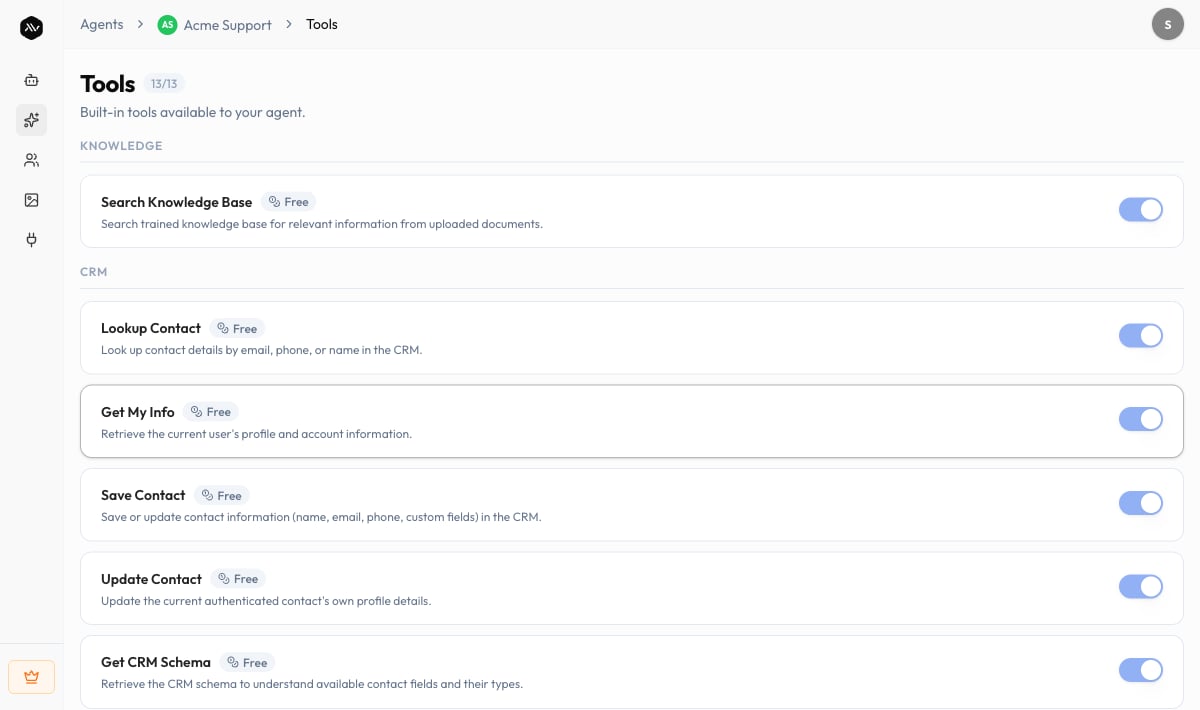
The exact set of tools available to an agent depends on the agent and may expand
over time. Use the live Tools screen as the source of truth for what your agent
can do today.
Tool categories
Tools are organized into categories so you can see at a glance what kind of action each one performs.Common built-in tools
These are representative built-in tools and their per-use credit cost. Most are Free; a few that trigger an outside action (such as sending a verification email) cost credits. Your live list may differ.Tool runs are billed in credits, the same currency as messages. Most tools are
free to run; the ones that cost credits charge per execution. See
Credits explained for how credits work.
Tools vs. Skills — which do I use?
They solve different problems and work well together.
A good mental model: a Skill is the plan for handling a task, and Tools are
the actions the agent can take while carrying it out.
Tips
Troubleshooting
The agent isn't using a tool I expected
The agent isn't using a tool I expected
Make sure the tool is enabled on the Tools screen, and that your
instructions don’t tell the agent to avoid that action.
The agent only calls a tool when the question clearly calls for it — test with a
direct, relevant question in the Sandbox.
A CRM tool isn't finding anyone
A CRM tool isn't finding anyone
I want a tool that connects to my own system
I want a tool that connects to my own system
The External category covers actions that reach systems outside A2V2.ai. If
you need an integration that isn’t listed on your Tools screen, contact us at
support@a2v2.ai so we can advise on what’s available.
Related
Skills
Author structured reasoning for complex, multi-step tasks.
Add knowledge
Give the agent facts to retrieve and cite.
Test your agent
Watch tools fire on real questions before you publish.
Credits explained
See how tool runs and messages consume credits.