

- Health Parameters — the schema of what your practice measures (vitals, labs, custom values). You manage these in CRM → Settings → Health Parameters.
- The contact Health tab — where readings are recorded, trended, and scored, on each contact’s detail page.
Health tracking is available on Medical Agents only. Configuring parameters happens in
CRM → Settings, which is desktop only. Anyone on the team can record a reading;
adding, editing, or deleting parameters requires an Admin. New to Medical Agents? Start
with the Medical Agents overview.
It comes ready with a clinical library
You don’t start from a blank page. A new Medical Agent is pre-loaded with 90+ standard clinical parameters — Blood Pressure, Heart Rate, Body Temperature, SpO2, Blood Glucose, HbA1c, a full lipid panel, CBC, liver and renal function, electrolytes, a thyroid panel, vitamins, coagulation, cardiac markers, urine analysis, and more — organized by category. Most practices can start recording readings immediately and only add parameters for anything specific to their program. To review the library, open your Medical Agent and go to CRM → Settings → Health Parameters. Use the search box to filter, or jump alphabetically to find a parameter fast.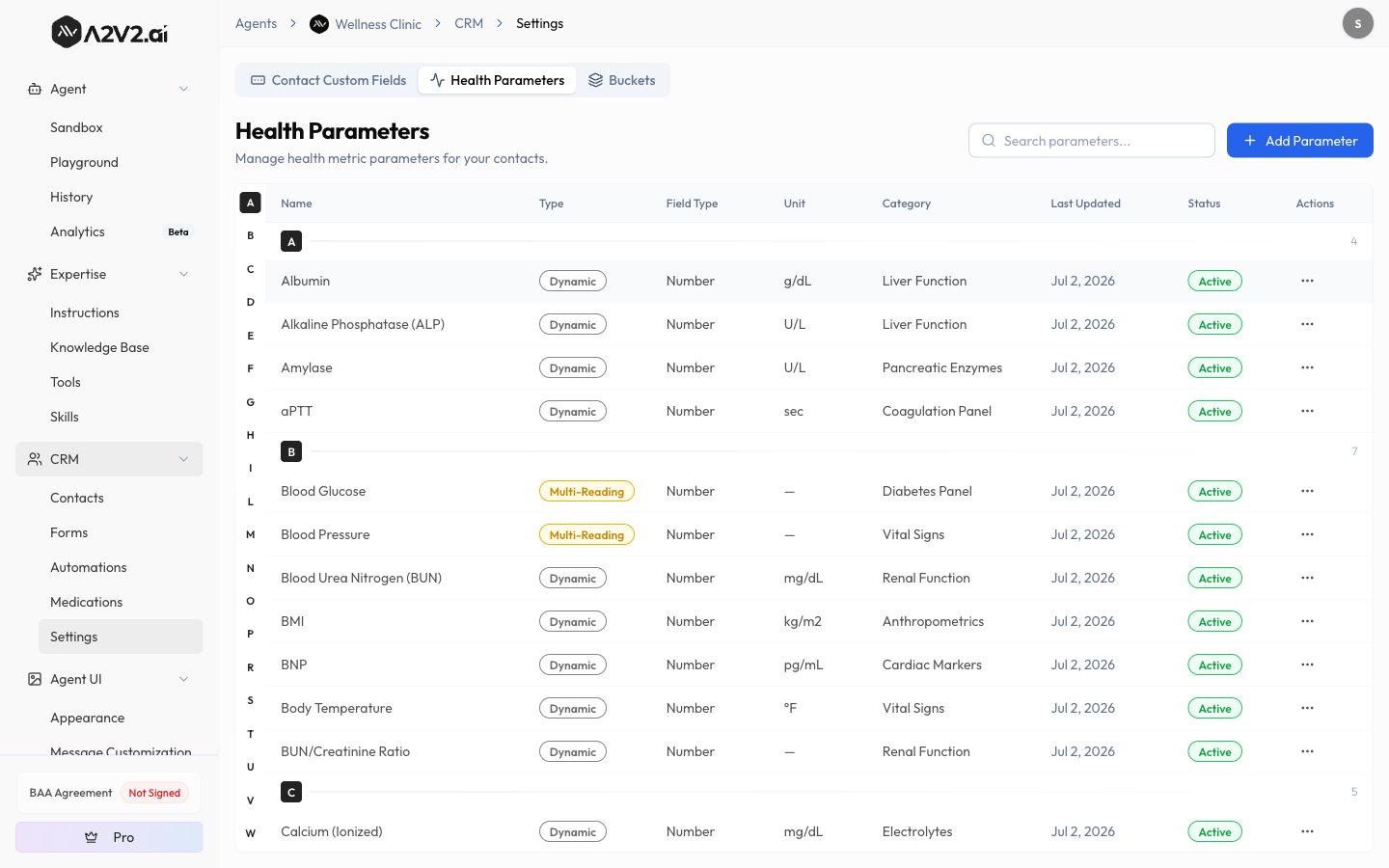
Parameter types
Add or edit a parameter
Most teams never need this — the built-in library covers common vitals and labs. Add a parameter when you track something the library doesn’t include.1
Open Health Parameters
In your Medical Agent, go to CRM → Settings → Health Parameters and select
Add Parameter.
2
Name and classify it
Enter a Parameter Name (up to 50 characters), pick a Parameter Type (Fixed,
Dynamic, or Multi-Reading) and a Field Type, and set an optional Unit,
Category, and description.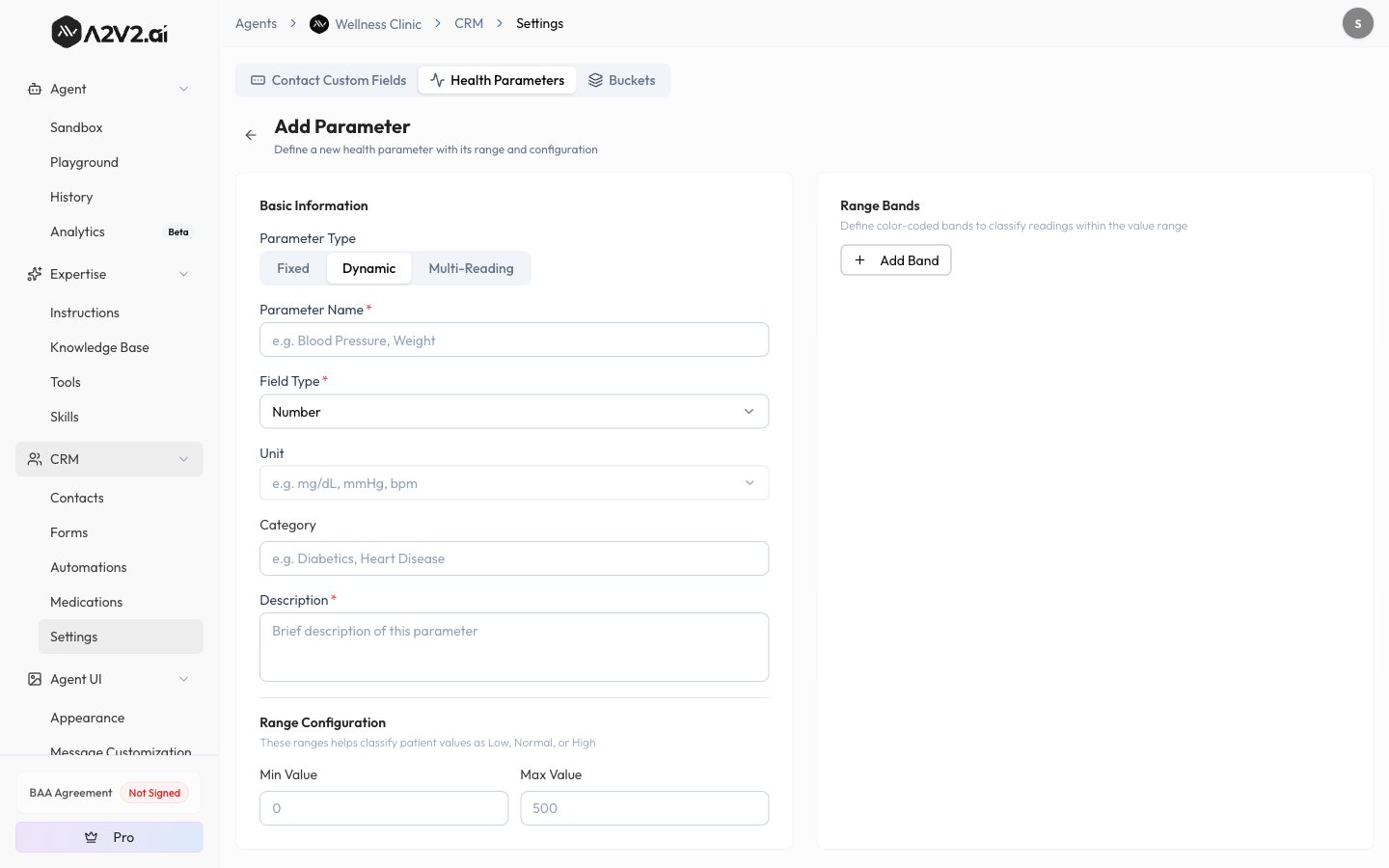
3
Set the normal range
For numeric parameters, set the Min Value, Max Value, and the Normal Min /
Normal Max that classify a reading as Normal or Abnormal.
4
Add range bands (for scoring)
Optionally define Range Bands — labeled segments of the value range (for example,
Low / Normal / High) that each carry a Health Score and/or Risk Score.
Bands are what let readings roll up into scores. They must cover the full range with no
gaps and no overlaps.
Range bands are the engine behind Health and Risk scores: a reading falls into a band, and
that band’s points are what get summed. A parameter with no scored bands still records
readings — it just won’t contribute to a score.
Record a reading on the contact’s Health tab
Open a contact and select the Health tab to see and record that patient’s readings.1
Open the Health tab
On the contact’s detail page, select Health. The tab lists the parameters that have
at least one recorded value for this patient — so it stays readable even though the
library holds 90+ parameters.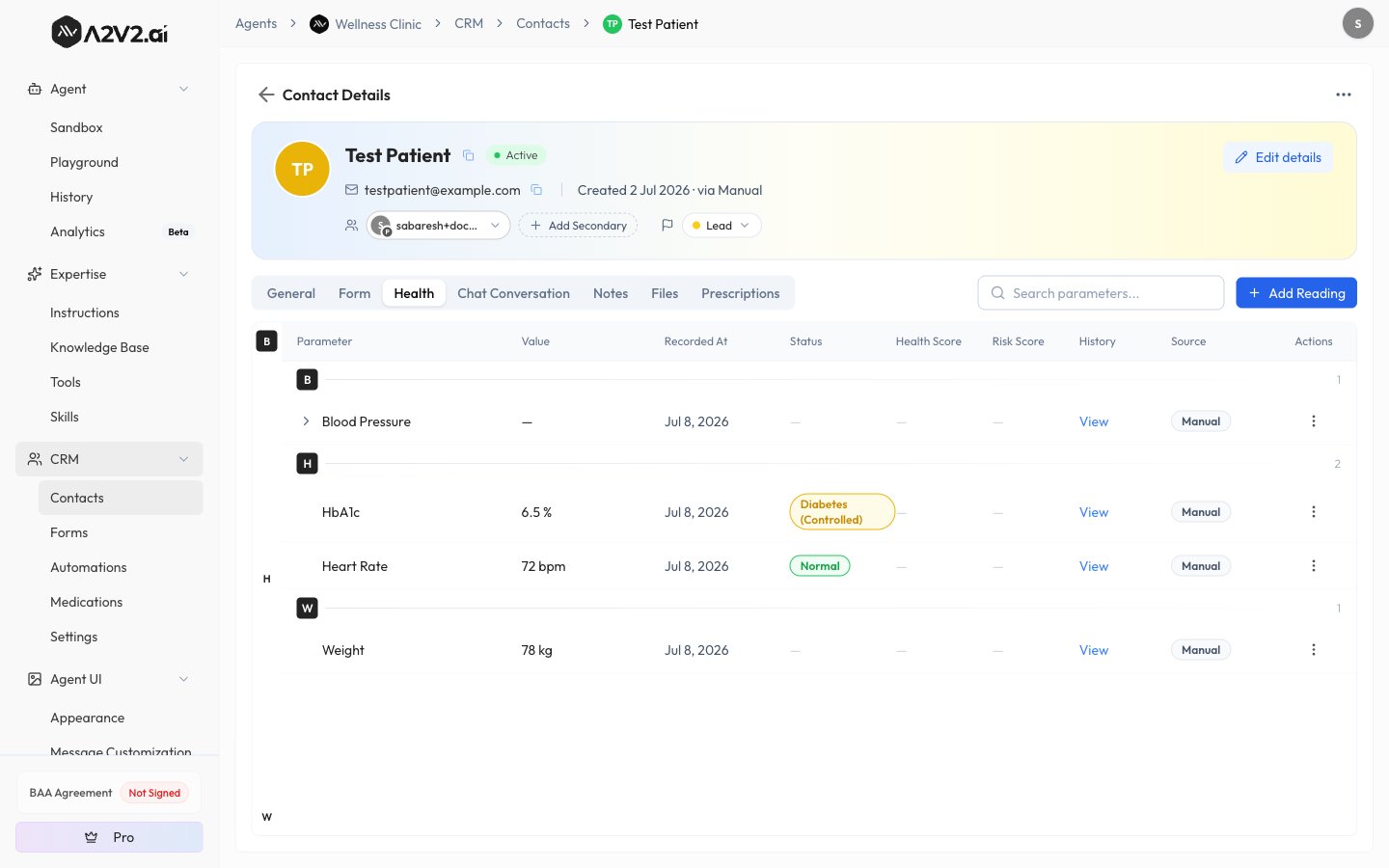
2
Add a reading
Select Add Reading. Search for the parameter, enter its value, and set the Date
and Time (defaults to now). Add optional Notes.
3
Enter multi-reading values
For a Multi-Reading parameter, enter each individual reading plus the overall
Result — for example, Fasting, Post-Meal, and the overall glucose result.
4
Review and save
A Review Reading step shows the date, time, notes, and values you entered. Select
Confirm & Save to record it.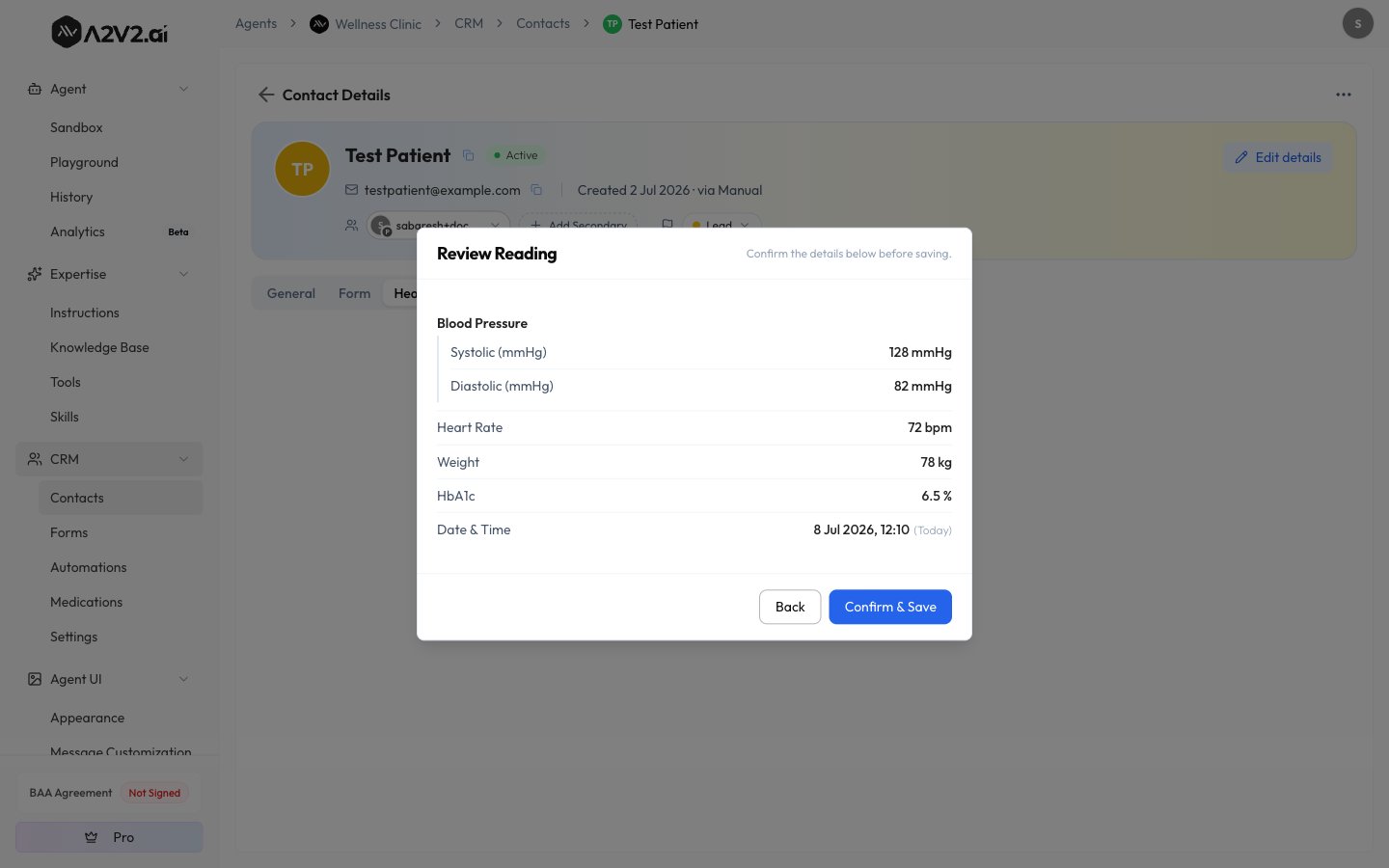
How readings get recorded
A reading’s Source is shown on the Health tab so you always know where a value came from:Document extraction returns candidate values for your review — it never saves a reading
on its own, and it doesn’t consume credits. Values that came from a document keep a link
back to the source file (an Open source document action on the row).
Read a patient’s history and trends
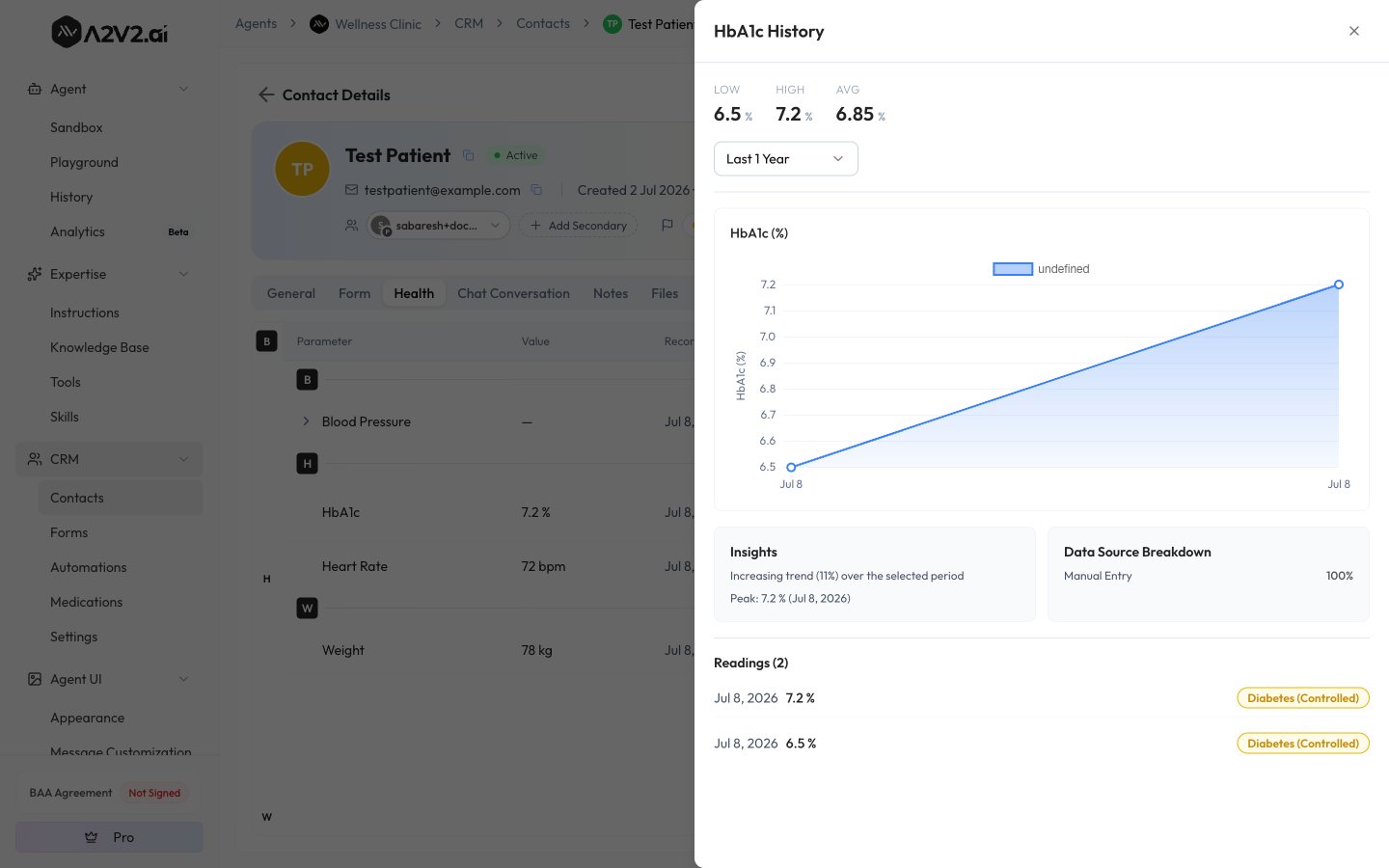
Each parameter row has a History action that opens a drawer with the full record for that patient:- Low / High / Avg statistics across the period.
- An Insights summary — a stable, increasing, or decreasing trend, plus the peak value.
- A Data Source Breakdown showing how readings were captured.
- A trend chart — which needs at least 2 readings to draw.
Show readings in a different unit
From a parameter’s row menu, Convert unit lets you display a reading in a different unit. This is display only, and applies only to your view on this device — it never changes the stored value or what teammates see.Health Score and Risk Score
When a parameter’s readings fall into scored range bands, they roll up into two totals for the patient:- Total Health Score — higher is better.
- Total Risk Score — higher means greater risk.
Delete a reading
Tips
Troubleshooting
I don't see a Health tab or Health Parameters
I don't see a Health tab or Health Parameters
Health tracking is available on Medical Agents only. On a general agent, the Health
tab and the Health Parameters settings don’t appear. See the
Medical Agents overview.
The Health Parameters screen says Desktop Only
The Health Parameters screen says Desktop Only
Configuring parameters is available on desktop only. Open the agent on a larger screen
to add or edit parameters.
A parameter isn't showing on a contact's Health tab
A parameter isn't showing on a contact's Health tab
The Health tab only lists parameters that have at least one recorded reading for that
patient. Record a reading and the parameter appears.
The trend chart is empty
The trend chart is empty
A trend chart needs at least 2 readings for that parameter. Record a second reading
and the chart appears.
A patient's score looks low but they seem healthy
A patient's score looks low but they seem healthy
Scores only count measured parameters, so a low score often means readings haven’t been
recorded yet — not that the patient is at risk. Check the measured-of-total count.
I can't add or delete parameters
I can't add or delete parameters
Creating, editing, and deleting parameters — and deleting a recorded reading — require an
Admin. Any team member can record a reading.
Related
Health buckets
Group parameters into named sets that roll up into Health and Risk score cards.
Medical Agents
What a Medical Agent unlocks and how the clinical suite fits together.
Contacts
How contacts work, and the tabs a Medical Agent adds.
Tebra integration
Import patients, health readings, and prescriptions from Tebra.